FF5 Draft: White Mage Hell

Today I am swapping things up a bit with my Steampowered Sunday post.  Originally the goal of this column was to force myself to play some games that were sitting in my steam backlog… which is huge.  However over time this has mutated a bit into “bel plays a game and reviews it”.  Today we are going to see some further mutation of this as I write about some madness that I allowed myself to get involved with along with my Aggrochat podcast co-hosts Kodra and Ashgar as well as occasional fill-in host Tam.  For some time Ashgar has participated in the Four Job Fiesta charity event that now helps out the Child’s Play charity.  The goal of this is to play through the epic game Final Fantasy 5 using a fixed set of jobs.

VisualBoyAdvanceM 2014-05-18 11-06-24-150 For those not familiar with Final Fantasy 5, it was a 16 bit era title that allowed you to choose what classes a fixed set of 4 characters would be by assigning them jobs.  While in the job they gained abilities that could then carry over into other jobs.  This became a min-maxers dream as you could make some extremely broken combinations.  As a result for years players have done various wierd combinations of this game for fun, and the Four Job Fiesta capitalized on this and turned it into a grand charity event.  For awhile Ash has wanted to do an internal draft of this game, where four of us get together and draft out a viable party made of of the different available jobs.  As a result each player has to make some compromises to determine what they want to go after first.

To facilitate this Ash decided to set up a card deck game using the amazing Google hangout app Roll 20.  He laid out the various sprites for the characters in rows representing the Wind Crystal, Water Crystal, Fire Crystal and Earth Crystal… adding the Freelancer as an optional job for the Earth Crystal given that specific one only has four options.  So again for those not as deeply familiar with the title as it seems to be among our little circle of mumble users…  the setup looks something like this.

The Job Options

Wind Crystal

  • Knight
  • Monk
  • Thief
  • Black Mage
  • White Mage
  • Blue Mage

Water Crystal

  • Red Mage
  • Time Mage
  • Summoner
  • Beserker
  • Mystic Knight
  • Mime

Fire Crystal

  • Beastmaster
  • Geomancer
  • Ninja
  • Ranger
  • Bard

Earth Crystal

  • Dragoon
  • Dancer
  • Samurai
  • Chemist
  • Freelancer

The Draft

The rules of the game that we are playing under is that each player must always have one of a given job, and from the moment you get your crystals… every character must have a job.  There are alternate rulesets where you can play with freelancer until you get all four jobs available, but we are playing with the more pure ruleset.  This as always means that some of the parties will have a much easier time than others.  Whoever gets stuck with Thief and White Mage will be struggling, since both of them have issues early game, and whoever has the Black Mage will have a supremely easy time rolling over everything in their way.  We opted to go with a draft order that minimized the advantage of being first, and the disadvantage of being last… that looks a little something like this.

ABCD | DCBA | BDAC | CADB

We decided to roll a 20 sided die in the Roll20 addon to get started and pick the order.  Ashgar using his dice hacking abilities rolled an 18, Tam rolled an 8, Kodra rolled a 5… and I rolled a very lowly and painful 2.  Meaning that in the above scenario Player A would be Ashgar, B would be Tam, C would be Kodra and I got stuck bringing up the rear with D.  However due to the order of the draft I feel like maybe I had a slight advantage.  Of course the Black Mage was gone by the time it got around to me, but I still had plenty of really good things to pick from, considering in this draft I got to make 2 picks back to back.   When all was said and done our party compositions looked like this.

Belghast – White Mage, Mystic Knight, Ranger, Samurai

Ashgar – Blue Mage, Summoner, Beastmaster, Dancer

Kodra – Black Mage, Red Mage, Bard, Chemist

Tam – Thief, Time Mage, Ninja, Dragoon

This surprisingly left the Knight completely untouched, which is an extremely good early game starter.  Not unsurprisingly no one picked the Berserker or Mime, or the Geomancer.  However I think we were all somewhat shocked that no one at all picked up the Freelancer, which ultimately ends up being one of the best options since they can be super customized.  I think overall each of us had a plan in the works, namely mine involved using Ranger to feed my Samurai.  Ash seems to like Blue Mage and Beastmaster which are super fiddly combinations… but he is methodical enough to make them work amazingly.  Kodra of course went for the power combo of Black Mage/Red Mage which will mean he has an extremely easy play through.  Tam went with a super focused build of being able to feed the Ninja and Dragoon, but will have the roughest start of all of us… since you cannot get thieves a weapon in the first town.

Reality Setting In

VisualBoyAdvanceM 2014-05-17 20-29-04-556 It was really during the first “post job” boss encounter that the reality of my choices set in.  I wanted to go for a very melee party, which meant I needed some extremely strong healing.  There is no stronger healer in Final Fantasy 5 than the White Mage, so it seemed like a no brainer pick.  However I did not really “grok” the reality of trying to play through with ONLY white mages up through the water crystal.  Karlaboss aka the fight above is the moment it really set in what I had laid out in front of me, as I slowly dinked away at 650 hp… 10 damage at a time.  Granted there was no way in hell he was going to kill me… but the entire process is just slow and tedious.

VisualBoyAdvanceM 2014-05-17 22-28-47-597 I made it through to the ship graveyard where finally I could start to grind away at the mobs.  My white mage party is uniquely suited for combating the undead, since this flavor of FF allows for you to case cure on the undead which becomes an offensive spell.  I made an early mistake in that I tried to podcast while playing this game, and wound up running out of mana and dying horribly.  However I reloaded from an earlier save state after we finished the podcast and continued on the journey.  I opted to grind my way to 10 on the undead hoping that would give me enough of a buffer to get through the next few fights before I finally get the water crystal and can make a party full of mystic knights.  Granted I will still have to keep one player a white mage, but that should work just fine given I will still need some healing.

White Mage Hell

VisualBoyAdvanceM 2014-05-17 23-03-44-311 The boss at the end of the ship graveyard was a complete pushover.  Generally speaking this is a pretty rough time for most parties considering she starts out living and turns undead a few rounds into the fight.  The undead version has the nasty added issue of poisoning players each time she hits them.  This quickly gets out of control for most parties, however with an army of white mages I just pushed forward nuking the hell out of her with cure.  It took two rounds of this after she turned undead to finish her off.  I calmly cured the poison and moved on. However as easy as this fight was, the next one turned out to be absolutely brutal.

VisualBoyAdvanceM 2014-05-17 23-30-16-066

As I climbed the north mountain to get to the wounded dragon Hiryuu, I started to question if I should have ground higher than ten in the ship graveyard.  I simply could not do crap against the mobs on the mountain, other than simply out survive them.  Additionally the flail that I picked up, and is now my saving grace… seems to miss quite a lot.  Instead of fighting I opted to run away from almost all of the fights leading up to Magissa.  I knew this encounter would take a truly insane amount of time.  She has 650 hp and as you can see from the above shot I was only whittling away around 12 hp per attack.  This was a sheer battle of willpower to keep moving forward at a snails pace.

VisualBoyAdvanceM 2014-05-17 23-37-20-000 When she summoned her pet Forza, I ignored him completely, realizing that there was no way at all I could keep up with fighting him and Magissa and the regeneration spell she casts on him.  Instead I opted to cast protect on my entire party, and used one of my white mages to heal folks up while the others slowly dinked away at Magissa until she fell.  Finally I turned my attention to Forza and focused all of the attacks on him.  Even doing this the “right” way, it still took about thirty minutes to push my way through the encounter with my army of “horrible monks”.  I was completely drained after that fight, and it was getting close to midnight so I stopped playing and streaming.  At some point today I will pick up where I left off.  You can watch the entire thing on my twitch stream, or you can check out the videos that I have uploaded to YouTube embedded below.  Additionally Kodra is streaming his play through so check out his channel as well.


AggroChat Episode 6

This week we have myself, Kodra and Ashgar for Aggrochat.  Rae was unavailable because honestly I feel like she was probably asleep.  She spent the day hanging out at the local Renaissance Faire with her brother and our good friend Dallian that appears on last weeks Aggrochat.  This week we had a bunch of things to talk about, or at least things that Kodra especially was excited to discuss.  The first of these was the new champion in League of Legends… Braum.  Next we talked about the Hex vs Wizards of the Coast lawsuit and what it means for the game and TCGs in general.  We also get on this long drawn out discussion of Kickstarter Fatigue and what it means for the kickstarters that are still coming out, and whether or not that is still a viable means of funding a project.  Like always we get lost on lots of rabbit trails between all of this points.

#AggroChat #FF5 #FinalFantasy5 #FourJobFiesta #SteamPoweredSunday
Rebooting Minecraft

Guild Meeting

I have an exciting evening planned that I have been looking forward to for a few weeks.  One of my long time House Stalwart guild members is here in town, and tonight we plan on having a board game night.  Dallian/Doctor Hannah appeared on Episode 5 of AggroChat, and we mentioned the upcoming visit there.  He lives in the Little Rock area which makes him a neighbor of ours as far as the internet is concerned.  I always think its cool when I get to meet someone in the flesh that I have gamed with for ages.  I think the plan tonight is to play loads of Munchkin and eat pizza at Rae’s house.  We’ve tried to invite several of the locals to meet up, so it should be really fun.  I am contemplating bringing some magic starter decks, but that might be a little too involved.  We’ve been talking with a co-worker about maybe trying to play some magic over lunch soon.  Apparently his wife is super into the game and would probably even come up over lunch to play it.

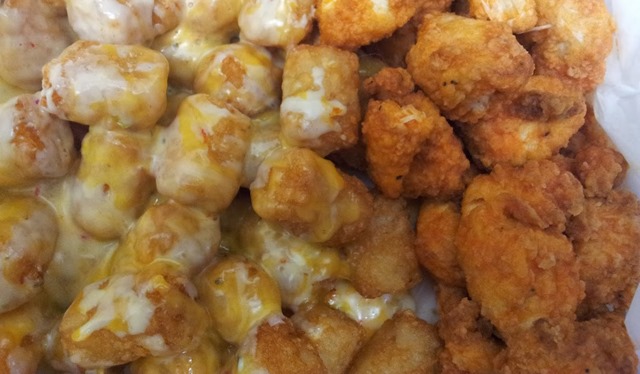
chickenandtots I don’t really do this sort of thing that often.  I guess the last guild member that I met up with was Lummox who happened to be about fifteen minutes away from where I happened to be staying in Albany.  It is always interesting to see how someone is in real life verses their in game persona.  For the most part, a lot of the people I have met have been fairly similar.  I have to say the closest was probably Urcasio and Ravener, who were pretty much exactly the people I would have expected based on in game interactions.  Since I generally find it easier to meet over food, Dal and I are meeting up before this evening for lunch.  For years I have been talking about how amazing Ron’s Hamburgers are, and more importantly their hot and spicy chicken and cheese tots.  So we are meeting up at my favorite location today around 11ish.  I would love to somehow steal him to town like I managed to do with Rae.  I feel like I am trying to build this little gamer community, one person at a time.

Rebooting Minecraft

Last week one of my new friends Missysmojo decided to try her hand at playing Minecraft. I joked with her that she would end up losing the next three months of her life.  She opted to stream a little bit, and it got me thinking.  It has been years since I have played Minecraft with any regularity.  There have been a few times I patched up my client and connected to the guild server just to see what folks were doing, but I had felt like I had “beaten” Minecraft for some time.  In this last year there have been significant changes in the game, and probably even more before that I really never noticed.  So I thought I would start a brand new game and play completely legit.  No mods, no helpful minimap… just the vanilla client and a texture pack (because yeah that is necessary).  The above video is the results of that process last night.  I am not really sure yet how often I will be streaming Minecraft, but I expect to continue where I left off each time.

For starters…  I am really not used to the game any longer.  I kept trying to “suck in” blocks and drops like you do in Trove.  The low performance of the game frustrated me, because I am not used to it “chunking” and loading in parts of the game slowly freezing my client momentarily when it does.  I am sure this is something I can tweak, because I probably just don’t have enough memory flowing to the default client.  There used to be a tool called Magic Launcher that handled a lot of the memory allocation for me, so I might look into that.  Another dumbass move is I totally thought I was on “survival” mode for the first little bit, running scared from potential monsters… only to find out that I actually was in peaceful mode on the client.  Once I noticed that and changed it things started to get interesting.

For starters, it seems like the creeper spawn rate is insane.  I maybe saw one or two zombies and skeletons the first night after flipping it to a normal mode, but I saw what felt like half a dozen creepers.  I managed to trap four chickens inside my base and I dug a pit like I often do and have them down there for a constant source of eggs, feathers and meat.  At some point I want to try and drag a couple of cows and pigs in there as well so I have all of my livestock needs handy.  Most of the video involves me setting up “base” as I hollow out a mountain, search for coal and finally start digging down into the earth in search of steel.  I encounter a cave with a skeleton spawner in it… and have a pretty epic battle trying to break the cave and torch it off.  I had quite a bit of fun, or at least more fun with Minecraft than I have had in ages.

Bunny Doom

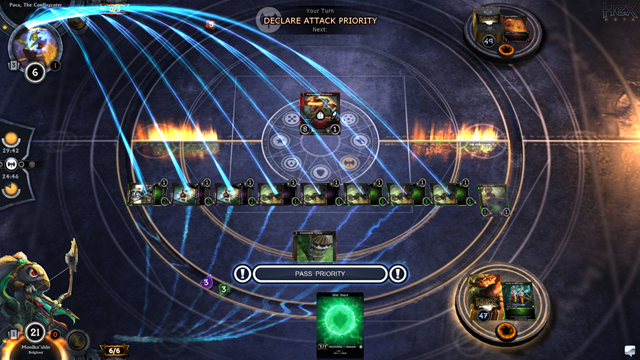
Hex 2014-05-15 23-48-43-201 I love everything there is to love about the Shin’hare, and the fact that they exist makes Hex so much more enjoyable than Magic the Gathering ever could be.  It’s an entire race of adorable evil samurai bunnies…  you could slap that into ANY game and I would play it.  As a kid one of my favorite comic book characters was Usagi Yojimbo… so everything about this deck feeds my enjoyment.  Not to mention that my favorite deck combination in Magic the Gathering was Green and Black… and the Shin’hare are exactly that…  Life and Blood aka Green and Black.  In some ways it reminds me of playing my thalid deck circa Fallen Empires.  I would constantly use that deck to feed my black “sacrifice or I feed” cards.  While I am lacking some of the cards in Hex to make this work really well, the starter deck mixed with a few cards I got from my packs seems to be working okay.

Last night I got in and played a few hands against the AI, mostly because it was getting late and I didn’t want to deal with people.  I am anxious for when trading comes into play, because of my group of friends I think I am really the only hardcore bunny player.  I should be able to help some of them out with cards they are looking for and bolster my bunny army.  My all time favorite card is still the Uzume, Grand Concubunny.  Not only is the artwork adorable, but the card is insane when you get it out into play.
When I first read this card, I assumed it would start dropping the 0/1 battle hopper tokens that the other Shin’hare cards do on the table.  While that would have been good enough, considering the normal concubunnies you have to expend resources and tap them to get this effect.  The real effect however is so much better, in that it summons a random non-unique bunny card into play.  This can be ANY card, even ones you don’t currently have in your deck.  It is literally generating cards for you, but the problem is this makes the card and insane aggro magnet.

I need to formulate some ways to protect the card, because really it is too damned valuable to not have it on the board for more than a few turns.  Hopefully soonish I can get together with my other friends currently in the closed beta and play some actual matches.  I feel like Kodra is in a completely different league with me, and like to play a style of magic that I do not… but this will not stop me from attempting to beat him.  He royally kicked my ass in hearthstone, but it didn’t stop me from coming back for more.  These type of games for me are about the moment to moment play and not whether or not I win.  In fact that can pretty much be said with any game I play, I am just not that competitive.  It is about the journey not the win conditions.

So You Want to Stream

Why I Stream?

This morning I found myself sitting here at the computer struggling to come up with a topic that I felt was worth writing about.  For the last several days I have been kicking around the notion of trying to do a very basic streaming guide, but really like everything I do… I don’t actually feel like I know what I am doing.  When I decided to start streaming on a whim a few months back, I had to pretty much figure everything out from scratch.  Thanks to lots of Google searches I managed to cobble together just enough information to do a passable job.  I am far from a streaming celebrity, and to be truthful no one actually watches my stream all that often.  I am happy to have a single other person in twitch chat with me.

So you might ask me then, why do I even bother streaming?  Honestly I am not really sure but it just seems fun to me.  There is something neat about showing the world what you are doing, and in some aspect that’s why we do any of this.  At least at a base level we blog, podcast, YouTube and stream all to share our lives with the world.  When I decided to start streaming I set up a structure on our guild voice server.  I created a channel called “Bel is Streaming”, and the basic idea was that if I was streaming I would join the channel and folks could pop in and chat with me… thereby making the entire feed seem more interesting.  This has worked pretty well, and on many evenings most of the people in channel are not even playing what I happen to be playing.

As a side note… I would not have had the courage to start the Aggrochat Podcast were it not for these streams.  For years I have said that we should be recording our mumble conversations… because some of the topics we end up delving into are really awesome.  It was while listening to one of these game streams one day at while working that I realized our nightly conversations sounded quite a bit like an impromptu podcast.  A few weeks later I was pulling together some of the regular members of these nightly discussions and AggroChat was born.  So if nothing else my piddling around with game streaming has had a mostly positive effect.   As to why I do it..  I am still trying to figure that one out.

Getting Started

The first thing you need to start streaming, is an account on a streaming provider.  The defacto industry leader right now is Twitch.tv which is the gaming offshoot of Justin.tv.  This is what I use personally but I have been hearing some really good things about Hitbox.tv for those who are wanting to use something different.  For the purpose of this guide we are going to primarily talk about what I use which is Twitch.  When you initially sign up, your username will be the default channel name for your stream.  However you can go into settings and change the Display name property to switch this up.  Basically I would suggest that you pick something simple and relatable to your blog or other social media efforts.  I am a simple monkey, so I try and pick /Belghast on all of the things unless it is already taken.

Moving forward what you really want from the twitch website can be found on the Dashboard.  You want to copy to a notepad document (or anywhere else you will remember it) the long string found on the Stream Key tab of the dashboard.  You will end up using this from that point on in any third party software to let you stream to your channel.  Another setting you might want to fiddle with while you are in the Twitch interface can be found on the Channel Settings page.  I highly suggest you toggle on the “Automatically archive my broadcasts” checkbox, because this opens up a whole world of options.  Firstly there will be folks that hit your page because it is “YOUR” page… not necessarily because you happen to be streaming something at the time.    Checking this box means that anything you broadcast will show up under the “Past Broadcasts” tab inside of your twitch profile.

The other cool thing this does for you, is that you can export directly from Twitch to YouTube.  Ultimately this is how I record anything that ends up on my YouTube channel.  I like keeping things simple, and being able to export directly without having to fiddling with the YouTube interface is a huge win to me.  The twitch interface is actually rather robust and it allows you to export individual segments of your video to YouTube, as well as having a default functionality to split videos into fifteen minute chunks.  By default YouTube will only allow you to upload videos that long until you have gone through the process of verifying your account…  which is an entirely different topic for a different day.  I am by no means “good at YouTube” but I do a passing job at having a channel.

You Need Some Software

Now in order to get your video stream to twitch.tv you are going to need some software.  I know absolutely nothing about Mac gaming…  so if you fall into this category, I am sorry this guide is going to leave you in the cold.  I am a PC gamer and as such only really experienced with PC configurations.  The Twitch broadcast page has a bunch of different options, and I am assuming that one or more of them can run on a Mac.  The “Gold Standard” in streaming seems to be Xsplit, as that is really what all the professional streamers seem to use.  However, to get the most out of it… it is a yearly subscription service.  I am totally fine with using the “Bronze Standard” in streaming software… because I am cheap.  That honor seems to fall to Open Broadcast Software or OBS, a very solid open source alternative to Xsplit.  Basically you have to ask yourself what your level of comfort is with software in general.  If you truly dislike fiddling with things until they work… save yourself some headache and pay for Xsplit.  If you are like me and are willing to scour internet forums for information to save some money… then OBS should work well for you.

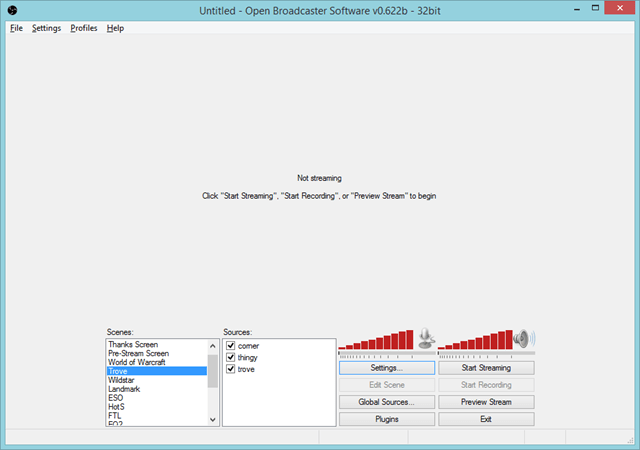
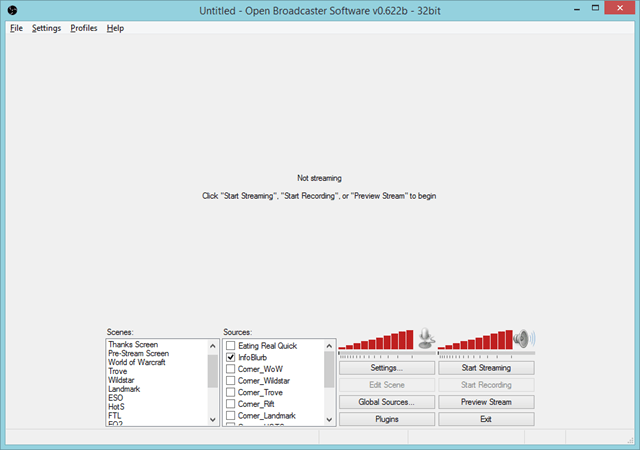
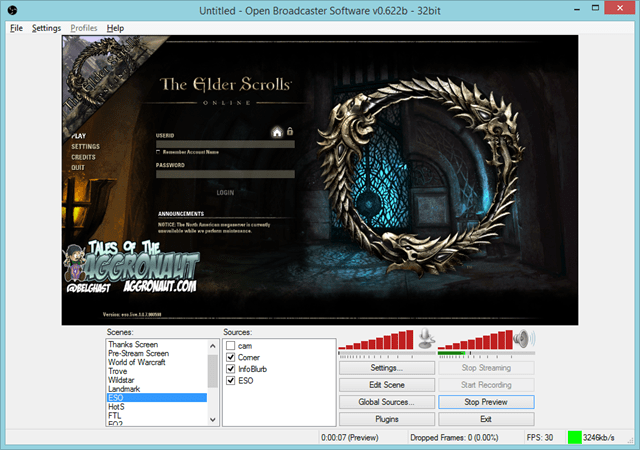
image This is what my OBS configuration looks like.  The software is arranged into a few basic concepts.  Scenes can be thought of as a “screen setup” that you plan on broadcasting to the world.  I have one set up for each game that I happen to be playing, as well as a generic “Thanks”, “AFK” and “Pre-stream screen”.  You can swap back and forth between these rapidly from within the software, so it is completely to personal taste how many you configure.  You are going to need at least one scene to be able to broadcast anything to the world.  The next concept is Sources… these are essentially things you want to place on screen at the same time.  One of these will be your video game feed, then a lot of streamers include a feed from their web cam and various image overlays.  You can use ANY transparent image, and overlay it on your video.

I personally keep things pretty simple, my personal preference is that I have an image in the top left corner identifying what game I happen to be streaming at a glance.  I find this important since sometimes it takes a time or two for twitch to actually update your stream title and game you are playing.  Additionally I have a “Tales of the Aggronaut” image that floats on screen… that I use for a pretty simple purpose, to cover up the majority of my chat box.  Not that I do anything super secretive in game, but I would prefer to guard anyone’s account information that might happen to be sending me a message for guild business.  Not that I have a lot of followers, but I don’t want to just assume that everyone I deal with in the games wants their information broadcast on the internet.  The floating image does a nice job of obfuscating the text but at the same time advertising my blog and providing my twitter information.

For the purpose of this setup, the most important thing that you add is a “Game Capture” source.  This will ask you to name the source, which can be anything that makes sense to you.  Next you will get a drop down of every active application on your system.  In this case you would choose whatever game you are wanting to stream.  On this same screen there is a “stretch image to screen” check box and generally I would suggest doing this.  This is going to be important for most Indie games especially since the resolution may not be the actual resolution you happen to be streaming.  I personally stream everything 1080p, but a lot of streamers drop down to 720p for the purpose of compatibility.  I can’t stand to play games at that low of resolution, so I have not really figured out a viable way to play at 1080p but have something scale me down to 720p without the stream looking like crap.

image At this point you want to preview your new Scene by hitting the “Preview Stream” button.  You should in theory see your game image coming through in the little window inside of OBS.  If you see nothing but a black screen… now begins the “fiddly portion”.  OBS generally seems to work best when playing a game in “Fullscreen Windowed” mode.  There are a few exceptions to this rule, but in theory you will want to configure your game to run in that mode if at all possible.  Black screen means you are not getting a feed of video from the game.  There are also options for “Window Capture” and “Monitor Capture”, but those are more thermonuclear.  If you choose to broadcast your Monitor, it will literally broadcast everything that comes across your monitor even stuff you don’t necessarily want to broadcast.  I suggest only ever doing that if you happen to have a multiple monitor setup.  Window Capture in general seems a little flaky, but right now I am having to use that for ArcheAge to get it to work well.

The Super Technical Bits

Now comes the hardest part of the setup, and the one I cannot give you any “firm” answers for.  There are a few settings that you need to configure based on your internet connection.  If you are not comfortable with thinking of things in terms of kilobits per second aka kbps…  then you are likely going to find this bit frustrating.  There are essentially two schools of thought here, the super technical is to go through a process of figuring out exactly what your connection will support and assigning the values accordingly.  The second school of thought is to try 2000, and if that doesn’t work smoothly… try 1500.  I am going to actually cover the technical aspects, because the trial and error method is exactly that.

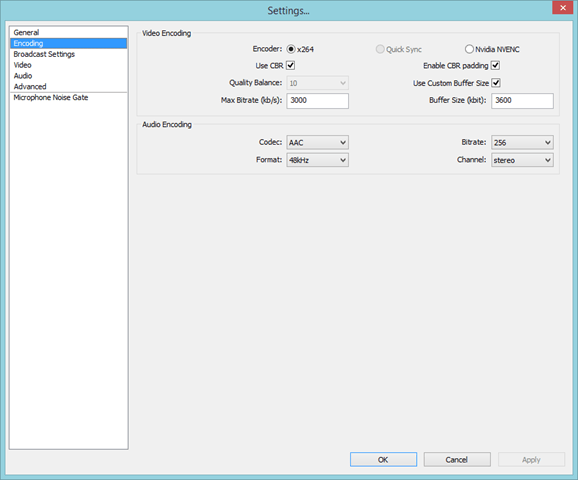
image Inside of OBS settings, there is the encoding tab, and more than anything else this tab dictates how smooth your stream looks.  For the most part everyone should be using the x264 encoder.  I did some tests with the Nvidia NVENC encoder, and the end results looked horrible.  It greatly reduced the system requirements of doing the encoding, the end result was a choppy and blocky mess.  Use CBR should also be checked as well as the CBR padding.  This means it is going to try its best to keep your stream at a constant bit rate, which should go a lot way to preventing stutters and stops.  The Audio settings should for the most part work for everyone as well.  The piece that is going to be unique however will be Max Bitrate and Buffer Size.  I personally like having a buffer a little bit larger than my Max Bitrate for extra padding and hopefully extra stability, however for most individuals they set these values to the exact same thing.

The above image is a test of my internet connection this morning while working on this post.  I will be using it as an example, but ultimately you are going to want to test your own line… because quite frankly my connection is way faster than most internet connections.  There are many testing providers out there but for this example I am using Speedtest.net just hit “Begin Test” and you should see your own results shortly.  This tester ends up giving us our speed in mbps, which is fine but for the purpose of the tool that estimates what these settings should be in OBS, we are going to want kbps.  This is simply a case of taking your mbps value, in this case 22.82 and multiplying it by 1024 the number of kb in a mb.  The end result in my case is 23367.68 kbps and then I take that number and dump it into the OBS estimator.  In my case it suggests that I set my max bitrate to 3500 and my buffer size to 3500 as well.  I however did not want my stream ever to take up my entire pipe so I dialed those back to the settings I actually use.

Hooking it to Twitch

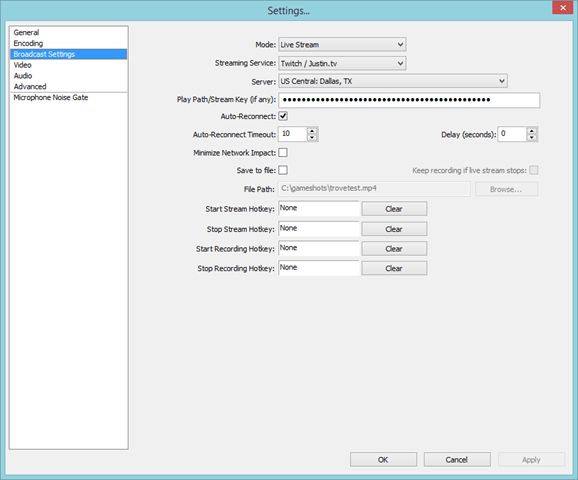
image Now that we have our encoding configured, it is time to actually hook the thing to Twitch.tv and see what happens.  Remember that stream key I asked you to copy out to a notepad document?  This is the point where you actually need it.  This is what twitch uses instead of a username/password authentication scheme to allow someone to broadcast to your channel.  Guard this with your life… or at least take some precautions because with this key anyone can use your channel.  You want to set the mode to “Live Stream” and since we are going to be piping our output to Twitch, you want to select the “Twitch / Justin.tv” option from the streaming service drop down box.  The next setting is pretty important, for Server you want to select the closest location geographically.  I live in the Tulsa, OK area so for me I choose “US Central: Dallas, TX” and it works pretty smoothly.  Finally you want to paste your stream key in the “Play Path/Stream Key (if any):” box.  If you did not copy this down earlier you can retrieve it from the “Stream Key” tab of your Dashboard.

Test That Puppy Out

image

If you did all of the things above, now you should be able to click the “Start Streaming” button and be off and running.  Some things to make sure before you do this.  Firstly make sure the game you are wanting to stream is running in the background and preferably running “Fullscreen Windowed” mode or whatever the equivalent is in that game.  Secondly make sure you have the correct scene selected inside of OBS.  Lastly I highly suggest you decouple your twitch account from your twitter account for the purpose of testing.  Otherwise every time you press that start stream button you are going to be spamming the hell out of your twitter friends.  In theory you should be able to open your twitch stream and see the output of your game on the screen.  But before you do it… there is one last thing.

image Make sure your stream is actually showing the correct game being played and the title you wish it to show.  I have had more issue with this one than anything else, and now I load my profile three times in a row just to make sure the edit took.  Initially it seems like the first edit NEVER takes.  When when I reload my stream I have to log back in and change it again, and sometimes it doesn’t actually take until I do it a third time.  I wish there was a way to set this inside of OBS, but as far as I know you have to keep logging into the Twitch website to set it up.  The only reason why this is important is because it will broadcast to people browsing the twitch interface that you are playing a specific game, and in theory you want it to be the right one.  At this point… press the start button, cross your fingers and hopefully you are live to the world.  If not… it is time to hit Google and figure out why exactly a given game isn’t working with this setup.  I am by no means an expert, but hopefully this guide will be useful to at least some of you.

Podcast That Almost Wasn’t

Graduation Day

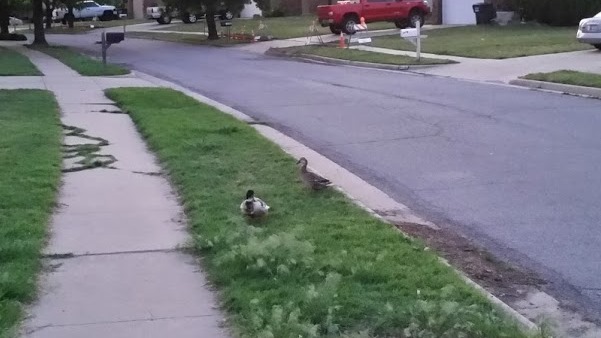
ducks I just thought I would start the post off with a picture of two ducks.  These are the ducks that we encounter quite often on our evening stroll around the neighborhood.  I guess they have decided that we are not really a threat, because shortly after snapping this photo the male duck decided to come up close enough to almost touch.  Granted he might have just been putting some distance between me and his mate, but I would like to think we are a recognized thing by now.  Now that you’ve had a lovely vignette, let me tell you about my day.  My nephew graduated from college today, and being the loving family we are… we attended.  This was an experience in both vertigo and insanely uncomfortable seating.  For starters the basketball stadium it was held in had some of the steepest seating I had ever experienced.  When they asked us to stand for the singing of the national anthem… I literally felt like I was going to topple over the “cliff” and down into the stands below me.

All in all it wasn’t really a bad day, but it was most definitely a tiring one.  I did however manage to top 10,000 steps on the fitbit, instead of my usual 8,000 to 9,000.  This was in part because we parked four blocks away from the stadium and walked it rather than fighting for parking.  The whole side effect of today and what will inevitably happen tomorrow is that I simply do not have the “oomph” to stay up late enough tonight to do a Steampowered Sunday.  In fact as early as we are going in the morning to see my mother, I won’t really have a chance to write a blog post in the morning either.  As a result I am writing this one Saturday night, and will publish it in the morning.  I hate when I have to “cheat” like this, but it is far better to do that than to miss posting something at all.

Podcast That Almost Wasn’t

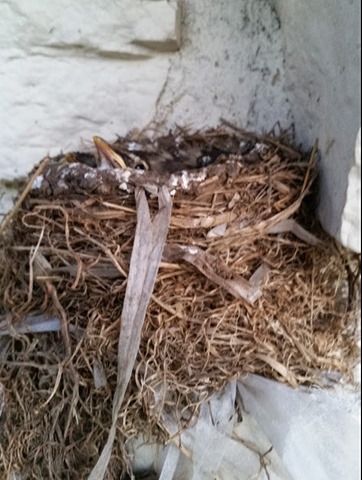
robins This morning I talked about the little family of robins, that had nested in the white rock.  When I came home tonight there were two chicks poking their heads out of the nest until I got close enough to investigate.  They instinctively ducked down to try and remain hidden but I was able to get my phone up enough to snap the photo on the side.  I feel like each of these photos is somehow softening the blow of what I am about to say.  This week you damned near did not get a podcast.  Admittedly this is one part miscommunication and one part poor planning on my side.  It was Friday during the day when I realized that I would not be home in time to record the podcast.  Originally for some reason my wife and I thought my nephews graduation was early in the day.  However upon further investigation Friday, we realized that it was at 4 pm in the afternoon.  That meant in a best case scenario figuring 2 hours for the graduation, an hour for anything after the graduation, and another 2 hours drive to get back home… this put me being back around 9 pm, and hour after we normally record.

To make things more interesting it seemed as thought both Ashgar and Kodra were not able to record at all this weekend.  Ashgar had a similar situation to me and when I spoke with him Friday it was from an airport as he was flying home for his sisters graduation.  Kodra on the other hand, I am not really sure what was going on, but he was neither available Friday or Saturday evenings.  He would potentially be available very late on Sunday, but that didn’t really give me much time to get things posted, since I normally post our new episodes Sunday.  After some scrambling, it seemed as though Tam was also not available.  As the day went on Rae and I discussed whether or not we even wanted to record with two people down.  I was of the opinion that we would just take the week off, but I guess Rae was really gung ho about going forward.  She thought in a worse case scenario it would just be the two of us and we would do a relatively short podcast.

Doctor Hannah to the Rescue

While my wife and I were walking Friday night, Rae was able to get ahold of a good friend of ours Dallian and he was able to fill in for us.  I had long thought that Dal might be a really good fit for the show, and him being able to do it on such short notice was almost serendipitous.  So we almost did not record the show, but in truth it ended up being one of the more enjoyable ones to make.  We talk about a number of gaming topics from Wildstar, to ArcheAge and the obligatory Elder Scrolls Online discussion.  We also dip our toes into the world of comic books and Magic: The Gathering and Dallian tells us the riveting tale of how he created the @Doctor_Hannah twitter account.  Hopefully the amount of fun we had recording this one translates to our listeners.

Hopefully next week things will be at least partially back to normal.  We should have Ashgar and Kodra back, but I believe Rae may not be available.  Dallian is coming into town to visit us, and either we will have both Rae and Dallian or neither of them.  In any case next week should be interesting as well.  At this point I am going to close off this post and crash, as I need to get up super early to make my Mothers Day visitations.  I want to wish all the Mother’s out there a very happy day, and I will see you all Monday morning for another early morning post.

#AggroChat #Podcast #ESO #Wildstar #ArcheAge