Making it Happen
Yesterday I talked at length about the design that goes into a podcast. While sure some people quite literally just start recording without much forethought, the best and most successful podcasts put quite a bit of effort into figuring out just how they want to go about the process of making their vision come to life. No matter how much prep work goes into the planning, there comes a point where you have to sit down and functionally record your podcast, and there are all manner of issues that arise. Most of us that go down this path lack the formal training with audio engineering to fall back on, so there is quite a bit of “sink or swim” that happens. Having gone through some of these decisions myself I thought I would talk about some of the hurdles that comes from the recording and editing of your podcast.
Recording the Podcast
The hardest part of the equation quite literally is how exactly you are going to record. If you can get all of the people you are needing to record in the same room it is a relatively easy situation of setting up a bunch of USB microphone inputs and having them all get recorded by a single piece of software. The problem being most podcasters have no physical contact with their co-hosts meaning that we are somehow going to have to make this whole thing work over the internet. When dealing with the internet you have all the standard problems of latency and network stability. Today I am going to cover some of the methods of recording remotely that I have seen or heard working very well.
The Skype Standard Method
Skype has managed become the gold standard as far as internet telecommunications software goes. While this started off as a relative rogue horse with the acquisition by Microsoft it has become absolutely ubiquitous. The problem being… it was not designed to record audio with. In fact Skype has no default method for recording either side of the conversation, and I would assume this is by design to keep away from any potential legal hurdles. The other negative is that excellent sound recording software like Audacity was not designed to work with something like Skype. As such you have to figure out how precisely you are going to make this work. Essentially the first hurdle you have to decide is if you are going to try and record individual speaker tracks or if you are going to record the resulting mixed audio.
Single Audio Tracks
Recording individual audio tracks is without a doubt the “purest” method of recording a podcast. This means each person is recorded separately and then can be mixed at a later date to create the final merged product. This means you can do all manner of post processing on audio levels, clearing up jitter and pops without effecting the integrity of other tracks. The problem is… isolating each speaker. There is software that will supposedly help you with this method but more than likely you are going to need to do a significant amount of research and testing to get it working correctly. The most tried and true method that I know of for this is the “everyone records themselves” method. Meaning that essentially each participant launches their audio recorder of choice and at the end of the show passes off their audio track for editing in later. There are a number of issues with this concept, not the least of which is that uncompressed waveform audio is way the hell too large to email. Secondly editing in multiple tracks is a mind numbingly boring process. If you record an hour long show expect to spend one hour per participant plus another hour or two on miscellaneous issues while trying to merge all this audio together by hand.
Merged Audio Tracks
The far more common method is that you simply “get everything right” before you start recording and record one merged audio track that represents the basis of your podcast episode. Generally speaking this involves getting a test call going first, and then setting up again to record the “real call” that will be the final product. Of note… my experience with Skype comes from co-hosting on other podcasts, and I chose not to go with this method myself. Some of my advice may not be absolutely accurate so before you set down this path do some legwork and research it yourself. The idea is that you start a Skype call and then have a third party software “catch” the audio and record it. Since this has become the default way of doing podcasts for many people you can imagine there are a lot of options out there for recording. Here is some of the software I have heard decent things about.
Voice Server Method
The method that I never really hear anyone talking about that has worked very well for me personally is recording off of a voice server. Both Teamspeak and Mumble offer the ability to record client side audio of what is actually being said on the voice server. Both servers we have used had their positives and negatives. The key negative of mumble is that all of the audio is recorded in a mono format, making the sound a bit hollow. The positive there however is that you could choose to record each participant to their own audio file allowing you to merge them together manual later. Teamspeak offers stereo output but merges all speakers into the same audio stream. Ultimately you have some of the same issues that arise with Skype in that you need to make sure that all of your speakers are as “clean” as possible before you actually record. Since we record on the voice server that we quite literally hang out on every single night, then this portion was pretty simple for us. There are a few things you really need to think about before going down this path.
Audio Codecs Supported
The server that we happen to record on supports a large number of audio codecs. This allowed me to set up a custom server channel and tweak the audio settings until I got a product that I was happy with. Currently the channel we record in uses the Opus Voice codec with a quality rating of 8, and this is something we had to tweak down a bit until we found a happy place. In order to maintain that quality of stream you need an uninterrupted 7 KB/s transmission but thankfully for the most part all of our participants have really solid internet.
Lock Down Your Channel
If you are going to record on an existing server that is already active, it is important that you have to lock down your channel. It is extremely easily for some well meaning person to pop into your channel out of curiosity and completely destroy your podcast. In theory you could get by with just naming your podcast channel something obvious like “Podcast Channel”, but I suggest taking the extra step of password protecting the channel. This allows me to hand the password out to regular guests and simply drag limited hosts into the channel manually.
Turn Off All Audio Queues
This one is absolutely important. Sure it is nice to know when someone leaves or joins the server but for the purpose of recording a podcast make sure you turn off all of this stuff. Someone popping on and off the server will be recorded in your final output stream.
Priority Speaker
This one has bit us in the ass a few times, but if your voice server uses a priority speaker system… make sure that ALL participants in the conversation are artificially elevated to priority speaker status. How priority speaker works is that it essentially lowers the volume of low priority speakers to make sure that the priority one is heard. This works great in a raid situation where one person needs to be delivering orders, this does not work well when you are expecting multiple people to be chiming in on a conversation. I am administrator on our voice server so I cannot turn off priority, so I just elevate everyone else to the same level while in the podcasting channel.
Google Hangouts Method
This is the method I honestly know the least about but I believe this is how Cat Context has been recorded for eons. You can check out this guide but I will try and cover the basics. The idea is that you start a Google Hangout On Air inviting all of the members of the show. This is recorded and afterwards you can export the video in MP4 format. From there you can take the MP4 and edit in an audio editor like Audacity and extract the audio only portion that then becomes your podcast. The benefit here is that instead of only having audio you also have video recorded of the hangout that can be uploaded to a service like YouTube allowing you to tap into a completely different audience from the traditional podcaster one. The negative is that you are putting all of your faith in Google Hangouts and hoping that the service will not have any hitches during the recording. In my own experience playing games over Hangouts, and having people drop in and out of the call… this one makes me more than a little edgy. I just wanted to throw it out there as an option because I know lots of people make this one work, and work extremely well.
Editing The Podcast
No matter how pristine you think your final recording is.. you will ultimately need to edit it somehow. Ultimately you can easily spend ten times as long editing the podcast as it took to record it. I personally go for a minimal editing process to safe my own sanity, but I know some folks that can take upwards to a week to get the final edit ready to go. The more you edit the faster you get, so expect your first few podcasts to take a significant investment of your time as you get used to your tools. My suggestions will be based on Audacity the extremely flexible open source audio editor. It works equally well on Windows, Mac and Linux and actually does an amazingly clean job of letting you edit just about anything you could ever want to edit. To make it even more extensible it supports a number of standard audio plug-in formats. Like I said above I take a pretty minimalistic approach to editing AggroChat so I am going to focus only on the features that I actually use.
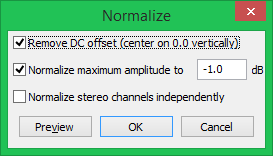
Normalize
 The very first pass I make is to normalize the audio. This helps to minimize the difference between the loudest volume speakers and the quietest volume speakers. Now you can completely squash any difference in volume if you really like but you end up with robotic sounding audio. I have personally found that I like the defaults pretty well. This is an extremely fast edit so should not take a lot of time, but the final result can be very noticeable.
Noise Reduction
 This pass is primarily for if someone I am recording with has a significant amount of white noise or audio “hum” when they record. For the majority of the time recording Aggrochat this was actually “me” that I was having to edit. This pass is a little trickier because of the way this tool works. Ultimately you need to highlight an area of the recording where the noise you want to extract is evident and use it as a sample using “Get Noise Profile”. From there you run the complimentary command of “Reduce” to essentially cycle through your audio and filter out that noise. It does a fairly good job but the more noise you filter, the lower the overall fidelity of your recording gets. This really needs a fine touch because if you filter too much you end up with washboard sounding audio as a result.
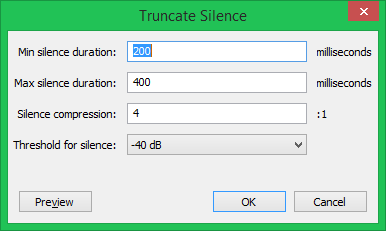
Truncate Silence
 If you have ever edited audio the thing you notice after the fact is just how many awkward pauses we make as human beings. Going back and finding these and eliminating them is pure tedium. I spent weeks doing this manually until it finally dawned on me.. that this should be something that is pretty easy to automate. After a little research I found the “Truncate Silence” tool and it is going to be your new best friend. What it does is essentially even out the silence in your track truncating any silences over a set amount and padding any that are under a certain amount. These are the settings that I go with for AggroChat, for Bel Folks Stuff I move it up to 400 and 600 respectively to allow a little more room for contemplative silence. Ultimately you will have to figure out what setting “feels” best to you.
Limit Your Futzing
You can literally spend hundreds of hours if you really wanted to obsessing over the wave form audio. I have stared at ours enough that I can literally tell you which person is speaking at any given moment from the shape of their waveform audio. Basically the end result is going to need to be something that you can live with, but at the same time does not take over your life as you keep editing and re-editing. To make my life easier I have created these files that I refer to as the “Canon” file that includes everything a show needs minus a given weeks audio track. I set these up once and then just paste the new audio into them before saving them out. You too are going to find little tricks that you can do to speed up your process. On a good night I will have the MP3 audio of our podcast ready to post within thirty minutes of finishing recording. The longer the recording the longer the edits will take, especially as you start doing things like noise removal. Those take a significant amount of processing time. Now that you have your audio recorded and ready to go, you are going to need a place to put it. Tomorrow I am going to cover the hosting of your podcast and some other bookkeeping tasks like publicizing. My hope is that someone will find this whole process useful and maybe it will spur on a few new Newbie Blogger Initiative podcasts as a result.

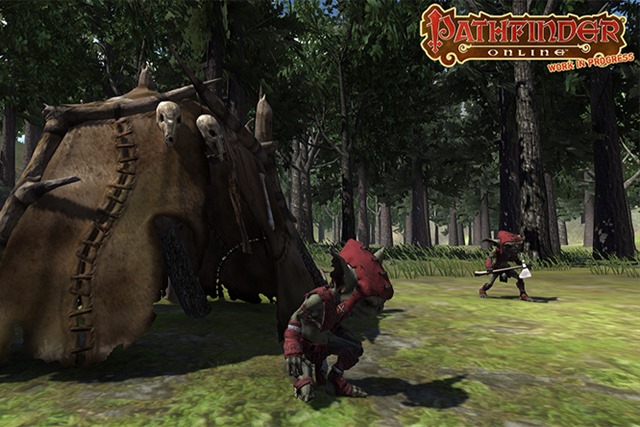 One of the interesting subtexts this week that we will likely talk about on tonight’s AggroChat is Kodra and Pathfinder Online. He has begun the descent into this game and been trying to drum up a certain measure of interest from the rest of us to join him. The problem is that as I listen to him talk about the game I realize that I have already played this. In fact I gave three years of my life to Everquest, and everything about Pathfinder Online feels like a nostalgic throwback to that era. I am sure it is a perfectly awesome game, but while I miss the sense of community we had back then there are many things I don’t miss about it. This is all the more relevant since right now the Ragefire server is open in Everquest and folks are flocking there for their own hit from the nostalgia pipe.
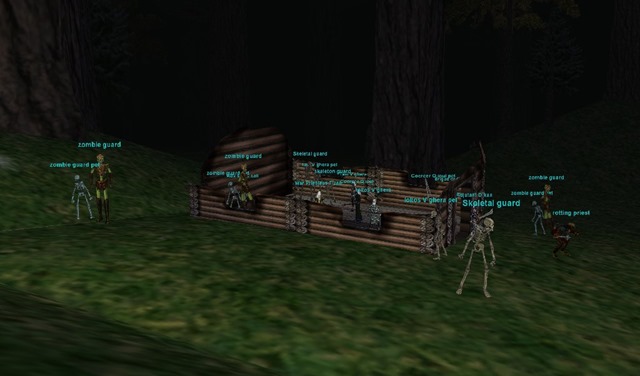 So while I don’t miss any of that bullshit, I do the constant and tangible sense of fear. The problem being that the modern games seem to have missed the boat in what exactly caused this fear. Right now so many of these sandbox games take the cheap route and make every player afraid of every other player. The problem with this is that it is counter productive to building a community. You want your players to band together, rather than avoid each other like the plague. What caused the fear was that the world was this scary and unknown place. There were no in game maps, there were no mob statistics… and it was the lack of information that made the world frightening. We didn’t know what we didn’t know… and often times our imaginations invented a far scarier scenario than the game servers were possible of creating at the time. We imagined complex plans within plans… and that the server was quite literally out to get us.
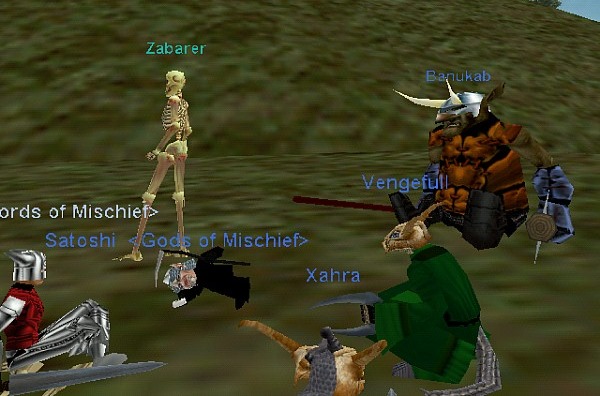 We are quite literally overloaded with information about the games we play. Knowing the amount of hit points a given mob has is just expected now, along with knowing every other intimate piece of information about the game. We know the attacks a creature is capable of making, and how exactly to counter them… before we even see said creature take a swing. Where this modern incarnation of Everquest nostalgia falls short is understanding that it was our lack of knowledge that made us afraid to venture into the world. It was not necessarily the harsh death penalties, and it most definitely was not that we were afraid of other players… it was that the world was cruel and unknown. The focus on PVP as a way of providing cheap content always seems to miss the point of why the original games worked. Everquest and Dark Age of Camelot worked more than anything because it caused players to be willing to look for help from anyone who would offer it.