Why I Stream?
This morning I found myself sitting here at the computer struggling to come up with a topic that I felt was worth writing about. For the last several days I have been kicking around the notion of trying to do a very basic streaming guide, but really like everything I do… I don’t actually feel like I know what I am doing. When I decided to start streaming on a whim a few months back, I had to pretty much figure everything out from scratch. Thanks to lots of Google searches I managed to cobble together just enough information to do a passable job. I am far from a streaming celebrity, and to be truthful no one actually watches my stream all that often. I am happy to have a single other person in twitch chat with me.
So you might ask me then, why do I even bother streaming? Honestly I am not really sure but it just seems fun to me. There is something neat about showing the world what you are doing, and in some aspect that’s why we do any of this. At least at a base level we blog, podcast, YouTube and stream all to share our lives with the world. When I decided to start streaming I set up a structure on our guild voice server. I created a channel called “Bel is Streaming”, and the basic idea was that if I was streaming I would join the channel and folks could pop in and chat with me… thereby making the entire feed seem more interesting. This has worked pretty well, and on many evenings most of the people in channel are not even playing what I happen to be playing.
As a side note… I would not have had the courage to start the Aggrochat Podcast were it not for these streams. For years I have said that we should be recording our mumble conversations… because some of the topics we end up delving into are really awesome. It was while listening to one of these game streams one day at while working that I realized our nightly conversations sounded quite a bit like an impromptu podcast. A few weeks later I was pulling together some of the regular members of these nightly discussions and AggroChat was born. So if nothing else my piddling around with game streaming has had a mostly positive effect. As to why I do it.. I am still trying to figure that one out.
Getting Started
The first thing you need to start streaming, is an account on a streaming provider. The defacto industry leader right now is Twitch.tv which is the gaming offshoot of Justin.tv. This is what I use personally but I have been hearing some really good things about Hitbox.tv for those who are wanting to use something different. For the purpose of this guide we are going to primarily talk about what I use which is Twitch. When you initially sign up, your username will be the default channel name for your stream. However you can go into settings and change the Display name property to switch this up. Basically I would suggest that you pick something simple and relatable to your blog or other social media efforts. I am a simple monkey, so I try and pick /Belghast on all of the things unless it is already taken.
Moving forward what you really want from the twitch website can be found on the Dashboard. You want to copy to a notepad document (or anywhere else you will remember it) the long string found on the Stream Key tab of the dashboard. You will end up using this from that point on in any third party software to let you stream to your channel. Another setting you might want to fiddle with while you are in the Twitch interface can be found on the Channel Settings page. I highly suggest you toggle on the “Automatically archive my broadcasts” checkbox, because this opens up a whole world of options. Firstly there will be folks that hit your page because it is “YOUR” page… not necessarily because you happen to be streaming something at the time. Checking this box means that anything you broadcast will show up under the “Past Broadcasts” tab inside of your twitch profile.
The other cool thing this does for you, is that you can export directly from Twitch to YouTube. Ultimately this is how I record anything that ends up on my YouTube channel. I like keeping things simple, and being able to export directly without having to fiddling with the YouTube interface is a huge win to me. The twitch interface is actually rather robust and it allows you to export individual segments of your video to YouTube, as well as having a default functionality to split videos into fifteen minute chunks. By default YouTube will only allow you to upload videos that long until you have gone through the process of verifying your account… which is an entirely different topic for a different day. I am by no means “good at YouTube” but I do a passing job at having a channel.
You Need Some Software
Now in order to get your video stream to twitch.tv you are going to need some software. I know absolutely nothing about Mac gaming… so if you fall into this category, I am sorry this guide is going to leave you in the cold. I am a PC gamer and as such only really experienced with PC configurations. The Twitch broadcast page has a bunch of different options, and I am assuming that one or more of them can run on a Mac. The “Gold Standard” in streaming seems to be Xsplit, as that is really what all the professional streamers seem to use. However, to get the most out of it… it is a yearly subscription service. I am totally fine with using the “Bronze Standard” in streaming software… because I am cheap. That honor seems to fall to Open Broadcast Software or OBS, a very solid open source alternative to Xsplit. Basically you have to ask yourself what your level of comfort is with software in general. If you truly dislike fiddling with things until they work… save yourself some headache and pay for Xsplit. If you are like me and are willing to scour internet forums for information to save some money… then OBS should work well for you.
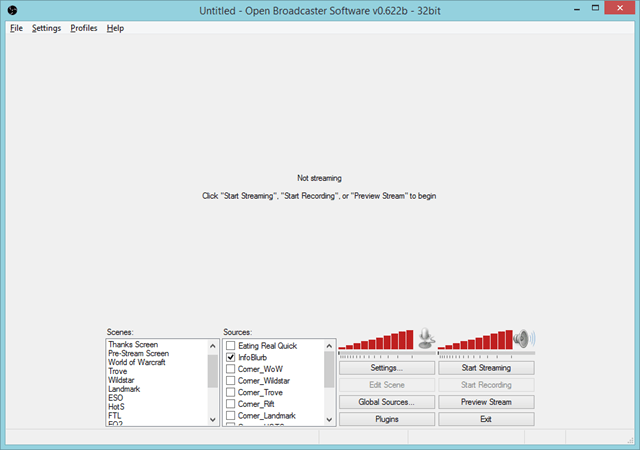 This is what my OBS configuration looks like. The software is arranged into a few basic concepts. Scenes can be thought of as a “screen setup” that you plan on broadcasting to the world. I have one set up for each game that I happen to be playing, as well as a generic “Thanks”, “AFK” and “Pre-stream screen”. You can swap back and forth between these rapidly from within the software, so it is completely to personal taste how many you configure. You are going to need at least one scene to be able to broadcast anything to the world. The next concept is Sources… these are essentially things you want to place on screen at the same time. One of these will be your video game feed, then a lot of streamers include a feed from their web cam and various image overlays. You can use ANY transparent image, and overlay it on your video.
For the purpose of this setup, the most important thing that you add is a “Game Capture” source. This will ask you to name the source, which can be anything that makes sense to you. Next you will get a drop down of every active application on your system. In this case you would choose whatever game you are wanting to stream. On this same screen there is a “stretch image to screen” check box and generally I would suggest doing this. This is going to be important for most Indie games especially since the resolution may not be the actual resolution you happen to be streaming. I personally stream everything 1080p, but a lot of streamers drop down to 720p for the purpose of compatibility. I can’t stand to play games at that low of resolution, so I have not really figured out a viable way to play at 1080p but have something scale me down to 720p without the stream looking like crap.
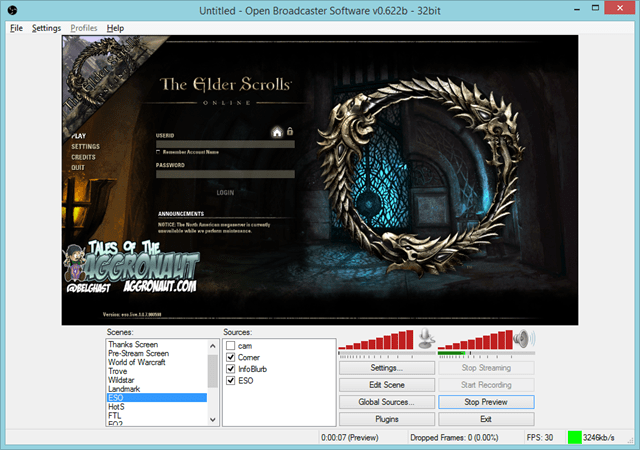 At this point you want to preview your new Scene by hitting the “Preview Stream” button. You should in theory see your game image coming through in the little window inside of OBS. If you see nothing but a black screen… now begins the “fiddly portion”. OBS generally seems to work best when playing a game in “Fullscreen Windowed” mode. There are a few exceptions to this rule, but in theory you will want to configure your game to run in that mode if at all possible. Black screen means you are not getting a feed of video from the game. There are also options for “Window Capture” and “Monitor Capture”, but those are more thermonuclear. If you choose to broadcast your Monitor, it will literally broadcast everything that comes across your monitor even stuff you don’t necessarily want to broadcast. I suggest only ever doing that if you happen to have a multiple monitor setup. Window Capture in general seems a little flaky, but right now I am having to use that for ArcheAge to get it to work well.
The Super Technical Bits
Now comes the hardest part of the setup, and the one I cannot give you any “firm” answers for. There are a few settings that you need to configure based on your internet connection. If you are not comfortable with thinking of things in terms of kilobits per second aka kbps… then you are likely going to find this bit frustrating. There are essentially two schools of thought here, the super technical is to go through a process of figuring out exactly what your connection will support and assigning the values accordingly. The second school of thought is to try 2000, and if that doesn’t work smoothly… try 1500. I am going to actually cover the technical aspects, because the trial and error method is exactly that.
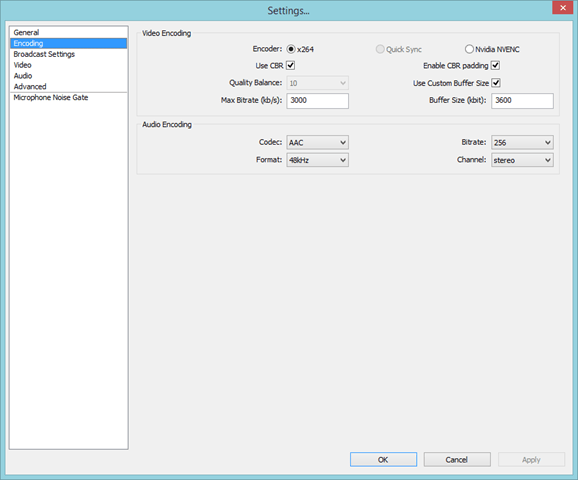 Inside of OBS settings, there is the encoding tab, and more than anything else this tab dictates how smooth your stream looks. For the most part everyone should be using the x264 encoder. I did some tests with the Nvidia NVENC encoder, and the end results looked horrible. It greatly reduced the system requirements of doing the encoding, the end result was a choppy and blocky mess. Use CBR should also be checked as well as the CBR padding. This means it is going to try its best to keep your stream at a constant bit rate, which should go a lot way to preventing stutters and stops. The Audio settings should for the most part work for everyone as well. The piece that is going to be unique however will be Max Bitrate and Buffer Size. I personally like having a buffer a little bit larger than my Max Bitrate for extra padding and hopefully extra stability, however for most individuals they set these values to the exact same thing.

The above image is a test of my internet connection this morning while working on this post. I will be using it as an example, but ultimately you are going to want to test your own line… because quite frankly my connection is way faster than most internet connections. There are many testing providers out there but for this example I am using Speedtest.net just hit “Begin Test” and you should see your own results shortly. This tester ends up giving us our speed in mbps, which is fine but for the purpose of the tool that estimates what these settings should be in OBS, we are going to want kbps. This is simply a case of taking your mbps value, in this case 22.82 and multiplying it by 1024 the number of kb in a mb. The end result in my case is 23367.68 kbps and then I take that number and dump it into the OBS estimator. In my case it suggests that I set my max bitrate to 3500 and my buffer size to 3500 as well. I however did not want my stream ever to take up my entire pipe so I dialed those back to the settings I actually use.
Hooking it to Twitch
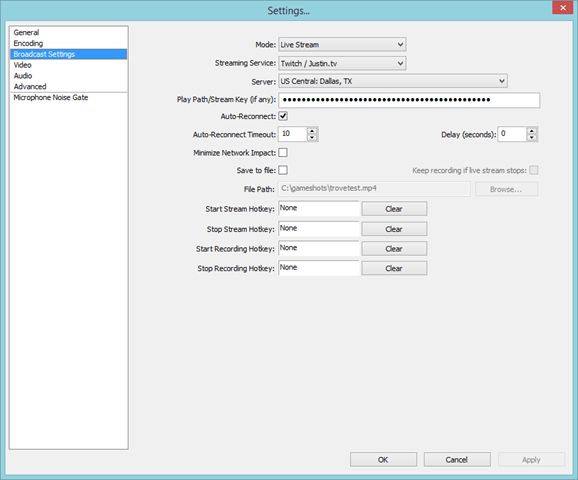 Now that we have our encoding configured, it is time to actually hook the thing to Twitch.tv and see what happens. Remember that stream key I asked you to copy out to a notepad document? This is the point where you actually need it. This is what twitch uses instead of a username/password authentication scheme to allow someone to broadcast to your channel. Guard this with your life… or at least take some precautions because with this key anyone can use your channel. You want to set the mode to “Live Stream” and since we are going to be piping our output to Twitch, you want to select the “Twitch / Justin.tv” option from the streaming service drop down box. The next setting is pretty important, for Server you want to select the closest location geographically. I live in the Tulsa, OK area so for me I choose “US Central: Dallas, TX” and it works pretty smoothly. Finally you want to paste your stream key in the “Play Path/Stream Key (if any):” box. If you did not copy this down earlier you can retrieve it from the “Stream Key” tab of your Dashboard.
Test That Puppy Out
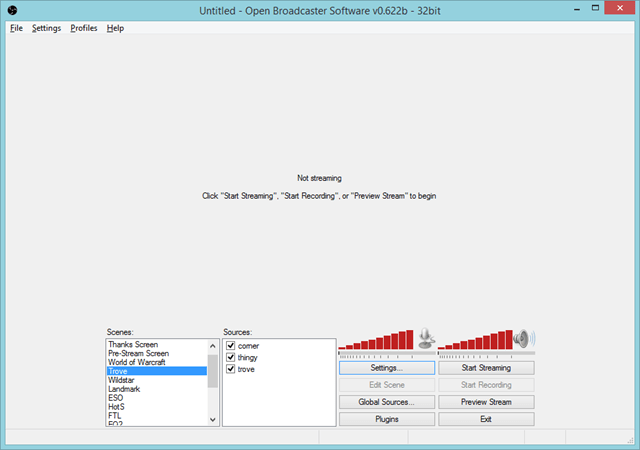
If you did all of the things above, now you should be able to click the “Start Streaming” button and be off and running. Some things to make sure before you do this. Firstly make sure the game you are wanting to stream is running in the background and preferably running “Fullscreen Windowed” mode or whatever the equivalent is in that game. Secondly make sure you have the correct scene selected inside of OBS. Lastly I highly suggest you decouple your twitch account from your twitter account for the purpose of testing. Otherwise every time you press that start stream button you are going to be spamming the hell out of your twitter friends. In theory you should be able to open your twitch stream and see the output of your game on the screen. But before you do it… there is one last thing.
 Make sure your stream is actually showing the correct game being played and the title you wish it to show. I have had more issue with this one than anything else, and now I load my profile three times in a row just to make sure the edit took. Initially it seems like the first edit NEVER takes. When when I reload my stream I have to log back in and change it again, and sometimes it doesn’t actually take until I do it a third time. I wish there was a way to set this inside of OBS, but as far as I know you have to keep logging into the Twitch website to set it up. The only reason why this is important is because it will broadcast to people browsing the twitch interface that you are playing a specific game, and in theory you want it to be the right one. At this point… press the start button, cross your fingers and hopefully you are live to the world. If not… it is time to hit Google and figure out why exactly a given game isn’t working with this setup. I am by no means an expert, but hopefully this guide will be useful to at least some of you.
Podcast: Play in new window | Download